


Knowledge Base
Our extensive knowledge base provides answers for most common issues and email setup. Start by selecting a category below.






Knowledge Base
Outlook(new) Email Set Up Guide
The new Outlook for Windows (labeled Outlook(new)) Is replacing Windows Mail. To set up Outlook (new), perform the following steps:
- Open Outlook(new). When opening for the first time, it should prompted you for your email address. Enter your email address and click continue.
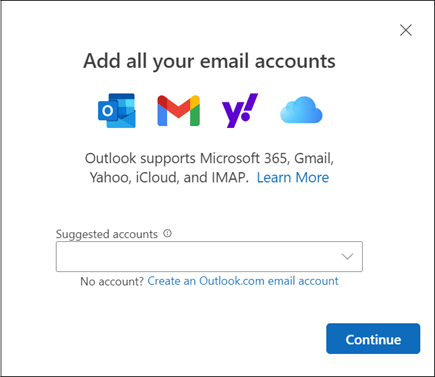
- Type in your password and click Continue.
- Click continue on the Sync your IMAP account screen

- Type in your password and click Connect.
Mac Clients
Mac Mail - Leopard
Mac Mail
Entourage
Power Mail
Opera
Domain Name Transfer
Steps to transfer your domain to Power Shift
Please use the following check list when transferring a domain to Power Shift:
- Contact current registrar of your domain name: Have them unlock your domain, supply you with an authorization or EPP code for transfer, and verify that the admin contact email is valid.
- Once this has been done let us know and Power Shift will be able to initiate the transfer of your domain.
- An email will be sent out to the current admin contact email on file at your current registrar to approve the transfer, if you do not approve it within 7 days, the transfer will be declined.
Billing FAQ's
How Can I Make Payments?
Payments may be made by Visa, Master Card, AMEX, Discover, E-CHeck by logging into My Account. You may also call in your Credit Card or E-Check info or mail a check to us PO Box 127 Stowe, VT 05672. Power Shift is striving to GO GREEN and encourage all customers to use either Credit Card, E-Check, or Email Billing. There is a $2.00 fee for paper statements.
What Is Your Billing Cycle?
Email billing is sent out around the 18th of each month. Hard copy bills are printed around the 18th each month and may take several days to process. Customers should expect to receive their hard copy bill around the 24th of each month. Credit Card and E-Check billing will be processed on the last day of each month.
When Is My Payment Due?
All bills are Due Upon Receipt. Customers have until the end of the month to pay, but, once an account has an outstanding balance carried over into the next billing cycle (usually on the 1st of the month), it is considered Overdue. If an invoice remains unpaid 6 weeks after the due date, a $2 late fee will be added and services may be automatically suspended. If the service is suspended, customers are responsible for the full month's fee.
What Is This Past Due Notice For?
Past Due notices are automated. The system that does not know the difference between $0.50 Overdue and $50.00 Overdue. Those notices are sent until the balance is paid or the account is suspended, whichever happens first. If the Overdue is for a small amount and you plan to include that amount with your next payment, just let us know and we will extend the account to prevent service interruption.
How Can I Cancel Service?
Please send us written notice to cancel service. In this notice, please include a brief reason for canceling and the date the cancellation is to take place. If email is available, just send a note to This email address is being protected from spambots. You need JavaScript enabled to view it., or mail a note to PO Box 127, Stowe, Vermont 05672.
Please be aware, customers are on the annual dial up plan will be refunded the remainder of their year, as though the used months were at the $19.95 rate, not the lower annual rate.
How Can I Suspend Service?
Suspension of service is free, and is useful for those who will be unable to access their account for brief periods (at least one billing cycle, up to one year), but want to ensure that their email address and username will remain theirs when they return. No new charges are incurred (with the exception of DSL circuit maintenance for DSL customers), when an account is vacationed, and the account can be re-activated with just a phone call during regular business hours.
How can I pay my bill online?
Navigate to www.pshift.com Click My Account at the top. Login using your account username and password.
Click Billing and go to Invoices to view your unpaid invoices and make a payment.
Downloads
Below are links to downloads of free software that Power Shift recommends.
Please Note: In no way are we affiliated with or support any of these products.
Recommended [other]Downloads[/other]
- AVG Anti Virus
AVG is a free Anti-Virus program.
- Filezilla FTP Client
Power Shift recommends Filezilla as an Open Source FTP client.
- Microsoft Office Compatibility Pack
For 2007 File Formats
 copyright Power Shift Online Services, all rights reserved. | 571 South Main Street, Stowe, VT 05672 | Toll-Free:
