


What We Do





Windows 10 Mail App
Please follow these instructions to set up email in the Windows 10 Mail App
- Open Mail
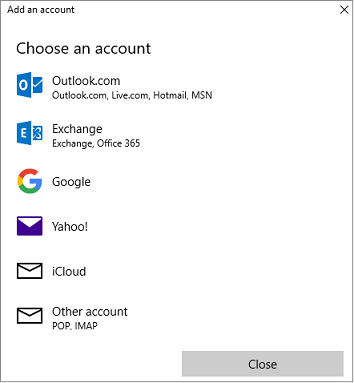
*If this is the first time you are opening Mail, you will see the below Add Account Screen
*If this is not the first time you are signing in, click the setting gear icon on the bottom left, click Manage Accounts, Click Add Account - then follow the instructions below.
- Click Other Account POP, IMAP
- Enter your Email Address, Your Name, and Password.
Click Sign In

All Done!
Outlook 2016 Email Set Up Guide
To set up Outlook 2016, perform the following steps:
- Open Outlook, click File in the top left corner.
Click Add Account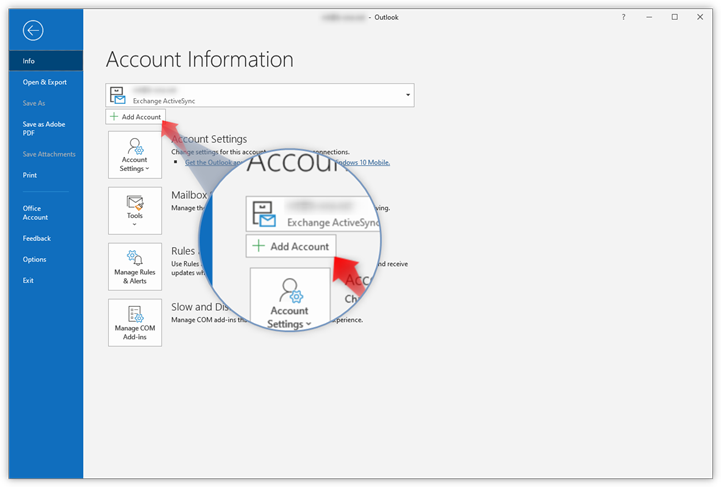
- Type in the email address you want to add and click Connect
- Type in your password and click Connect.
- Select the IMAP radio button, Click the Next button and enter the following information:
Note: If Outlook cannot detect your settings automatically, please select IMAP and then enter the settings below
- Incoming mail: secure.emailsrvr.com - 993 - SSL/TLS
- Outgoing mail: secure.emailsrvr.com - 465 - SSL/TLS - Click Done to complete setup.
Power Shift is now offering Microsoft Exchange, Office 365 services! For only $10/box per month, you can upgrade your email to a Microsoft Exchange inbox. What's more, this plan includes online versions of the following Microsoft Applications:
- Microsoft Word
- Microsoft Powerpoint
- Microsoft Outlook
- Microsoft OneNote
- Microsoft Publisher
- Microsoft Excel
Each user also has access to their own Microsoft OneDrive, with a whopping 1TB of storage space! Sharepoint and Skype for Business are also included with each box! Ready to upgrade your mail experience? This email address is being protected from spambots. You need JavaScript enabled to view it., and to begin the migration process!
SiteBuilder is here, and better than ever!
Introducing the updated Power Shift SiteBuilder, a better way to build compelling websites without expensive developer costs and coding. SiteBuilder uses state of the art drag and drop frontend editing, allowing you to create and edit layouts with the click of your mouse! Choose from countless page layouts, or, build from scratch using intuitive and easy to manage tools. Here are a few of the many features offered by Power Shift's SiteBuilder:
Versatile & Scalable
SiteBuilder allows you to create a wide variety of websites, including blogs, video galleries, portfolios, business pages, and more! Need to add a new page? SiteBuilder allows you to easily expand your existing site by quickly adding pages, images, newsletter signup forms, and much more!
Mobility is Key
All SiteBuilder sites are responsive and mobile friendly. This means your new site is guaranteed to turn heads regardless of the viewing device! You can even control what your site looks like on mobile versus desktop, and add or remove elements from each version. Not a fan of the slideshow in mobile? Simply disable it, with the click of a button!
Affordable and Practical
The average cost of a basic custom built website is roughly $5,000. Custom built sites also require constant upkeep and maintenance, not to mention hosting fees. While viable solutions for many larger companies, small businesses generally can't justify that level of spending and ongoing support.
SiteBuilder is only $19.95 per month, and basic framework updates are included in that fee, making SiteBuilder the perfect choice for your small business. Did I mention that hosting is also included in that cost?
Non-proprietary and Open-Source
Unlike the competition, SiteBuilder is built using the WordPress framework. This means that if you ever need to move the site to another hosting provider, you can! Outside developers can also easily work on your SiteBuilder site, too, if you are looking to add custom functionality. Because there is nothing proprietary about our software, you're not tied to our hosting, or our service. Squarespace, Wix, and most others can't say the same!
Ready to build? Simply call us, or This email address is being protected from spambots. You need JavaScript enabled to view it. to get started. Need more convincing? Why not give SiteBuilder a test-drive?This email address is being protected from spambots. You need JavaScript enabled to view it., and ask for your sitebuilder demo today!

 copyright Power Shift Online Services, all rights reserved. | 571 South Main Street, Stowe, VT 05672 | Toll-Free:
