


What We Do




Biz-Host Web
(Simple & Effective)
Best Suited For:
Personal use or Small Businesses, Static HTML sites or basic WordPress Sites.
Features:
5 Gb Storage
Unlimited Bandwith
Up to 2 Domain Cloud Emails at $2.95 each
Reliable shared VPS hosting
Daily Backups via Amazon S3 Cloud
24/7 Support
$13.95 / month
$155.40 / year
Biz-Host-Plus
(Accessible & Secure)
Best Suited For:
Small to medium-sized businesses, lite e-commerce stores. Ideal for CMS based websites running Joomla, WordPress, Drupal, Etc.
Features:
25 Gb Storage
Unlimited Bandwith
Up to 2 Domain Cloud Emails at $2.95 each
Reliable shared VPS hosting
24/7 Support
Daily Backups via Amazon S3 Cloud
Added Security via CloudFlare
$26.95 / month
Biz-Host-Max
(Business Web Site)
Best Suited For:
Business and e-commerce sites for larger companies.
Features:
50 Gb Storage
Unlimited Bandwith
Up to 2 Domain Cloud Emails at $2.95 each
Reliable shared VPS hosting
24/7 Support
Daily Backups via Amazon S3 Cloud
Hack Removal (if needed)
24/7 Site Monitoring (via Pingdom)
Premium Cloudflare account
$51.95 / month
Hosting & Domains
An awesome website is only good if you can rely on it to be there. Without a safe, dependable hosting environment, your website is prone to downtime. And without a memorable domain name, visitors will have trouble finding you.
We understand these dynamics all too well - that’s why all of our plans use WHM & cPanel, one of the most reliable, powerful, and easy-to-use hosting platforms on the web. You’ll also get two discounted CloudMail email addresses, and some awesome ancillary features such as free SEO tools, analytics reporting, automated backups, databases, SSL certificates, generous transfer and storage speeds, and a whole lot more.
Don’t fret over renewal deadlines! After we register your domain name, we’ll take care of renewing it every year. If you’re struggling over the perfect domain name, just give us a call; we’ll put our advanced Domain Name Suggestion Software to work, generating ideas for this critical piece of your business-marketing plan.
And did you know that when you sign up for a domain name, your personal information gets tossed into the public Who Is database? To guard against email spam and unwanted phone solicitations, consider upgrading your account with Domain Who Is Privacy. For an additional $8.95, we’ll make sure that your Who Is information stays safe, secure, and away from prying eyes.
Just some of the Power Shift Hosting advantages
- Power Shift Web Hosting Rates include our unparalleled customer support as well as the latest technologies on our Linux Servers.
- We Offer cPanel access to manage your web site from a Web Browser with features that include FREE SEO Tools, Analytic Reporting, Back Ups, Databases, SSL, and many more.
- Power Shift makes it simple to add a Blog, Content Management System, Wiki, Bulletin Board, Photo Gallery, Shopping Cart, to your site using Fantastico in your Control Panel.
Three hosting plans to meet your needs
Our Web Hosting plans include discounted CloudMail E-Mail Hosting. We use the latest technologies on our Linux Servers including cPanel Control Panel Access, FREE SEO Tools, Site Builder, Web Site Analytics, 1 Click Web Application Installs and many more. With plans starting at $13.95, we make owning a website affordable!
With each Power Shift domain name, you’ll get the following features:
- Online Account Management Tools
- DNS Management
- Customer Service & Support
- Domain Locking & Forwarding
- Registration Information Management
- Parking Page
- Auto Renewal
- Optional Who Is Privacy
REGISTER OR TRANSFER A DOMAIN NAME, CLICK HERE
Blackberry
Chatter Email
Snapper Mail (Palm OS)
Versa Mail (Palm OS)
Click on any of the deals above to request services! The drawing for the free responsive website will be held on November 15th, 2015.
To set up IMAP, do the following:
1. Tap Settings, Mail, Contacts, Calendars, Add Account, Tap Other and then Add Mail Account.
2. Enter the following information in the spaces provided:
- Name—Enter your first and last name. This is the name that will appear in the From field of messages you send.
- Address—Enter your entire email address (e.g., This email address is being protected from spambots. You need JavaScript enabled to view it.).
- Password—Enter the password for your email account.
- Description—Enter a descriptive name for the account (e.g., Work Account). This description will be visible only to you.
3. Tap the Save button.
Note: If IMAP is not already selected, tap the IMAP button.
4. Under both the Incoming Mail Server and Outgoing Mail Server sections, enter the following information:
- Host Name—Enter the secure server name: secure.emailsrvr.com
- User Name—Enter your entire email address (e.g., This email address is being protected from spambots. You need JavaScript enabled to view it.).
- Password—Enter the password for your email account.
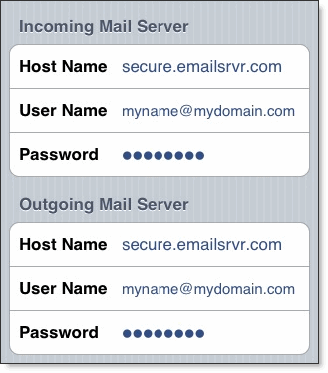
5. Tap the Save button and the device will verify settings and return to the Mail, Contacts, Calendars screen.

 copyright Power Shift Online Services, all rights reserved. | 571 South Main Street, Stowe, VT 05672 | Toll-Free:
